Quotation Software with Online Approval: Faster Collection in the 2026 E-Invoicing Era
When does a quote become money in your account? Not when it is sent, not even when the customer agrees verbally, but when it is clearly approved, the work is done, the invoice is issued and the amount is collected. Every gap between those points means more days of waiting, and sometimes an amount never collected.
In this article we follow the money from writing the quote to reaching your account, and spell out exactly where a CRM's job ends and the accounting software's job begins in the e-invoicing era.
What is the difference between a quote and a tax invoice?
A quote is a commercial document stating what you will deliver and for how much, issued before the work. A tax invoice is issued after supply under ZATCA requirements and must be generated electronically by a compliant invoicing system. Neither replaces the other.
| Criterion | Quote | Electronic tax invoice |
|---|---|---|
| Timing | Before the work | At or after supply |
| Purpose | Agree scope and price | Prove the sale and tax due |
| Issued by (in the HUE setup) | HUE CRM | Accounting software (Wafeq, Daftra or Qoyod) |
| Fatoora integration | Not required | Required per phase and wave |
| What follows | Approval, then a production order | Collection and accounting entries |
What makes a quote that gets approved quickly?
A quote that gets approved fast leaves the customer no questions. It lists items with measurements and units, totals before and after tax, payment terms and lead time, and reaches the customer in a way that lets them approve on the spot.
- Customer, project and location details
- Line items with measurements, unit and quantity
- Price before and after 15% VAT
- Lead time and expected installation date
- Payment terms: deposit and later instalments
- Quote validity period
- A clear way to approve
In made-to-measure trades such as aluminium, kitchens and curtains, the quote should be built directly from the measurements recorded on site, as explained in From measurement to installation.
How does online quote approval work?
Instead of sending a file and waiting for a vague reply in a chat, the customer gets a link, opens the quote on their phone, reviews it and approves it. The approved version is saved in the order record, so there is no later dispute over what was agreed.
- Prepare the quote from customer data and measurements in HUE CRM.
- Send the link over WhatsApp with a ready message suited to your trade.
- The customer reviews it on their phone without downloading files.
- Approval in one tap moves the order status automatically.
- Convert to a production order and real work begins.
Speed is not the only benefit. A recorded approval protects the business in any dispute over measurements or specs, and gives management an exact count: how many quotes were sent, approved, still pending.
What mistakes delay quote approval?
Approval is usually delayed because the quote raises more questions than it answers, or arrives after the customer's interest has cooled. Every day between the measurement visit and the quote gives the customer time to ask for other offers.
- Sending the quote days after the visit: better to prepare it the same day from the recorded measurements
- One total with no breakdown: customers want to see items and measurements to accept the price
- Unclear tax: the price before and after VAT must be shown clearly
- No payment terms: when instalments are not in the quote, negotiation restarts at execution
- No easy way to approve: asking the customer to print, sign and photograph the quote delays the decision
- No follow-up: a quote with no logged follow-up date can be forgotten by both sides
How do you handle customer changes to a quote?
Changes are a normal part of selling, especially in made-to-measure work: the customer switches the aluminium colour, adds a cabinet or picks another fabric. The risk is not the change itself but losing track of versions: which one did the customer approve, and at what price?
The practical rule: every change is a new version of the quote inside the same order record, and the approval link is resent after any significant change, so only the latest approved quote reaches production. State the quote's validity period too, so a customer cannot return months later expecting a price whose costs have changed. The business stays protected and the customer stays clear on what was agreed.
Where does HUE CRM's job end and accounting software's begin?
HUE CRM's job ends when it prepares the invoice draft after the quote is approved and the work done, then sends it to your accounting software (Wafeq, Daftra or Qoyod). The accounting software issues the e-invoice and handles integration with Fatoora.
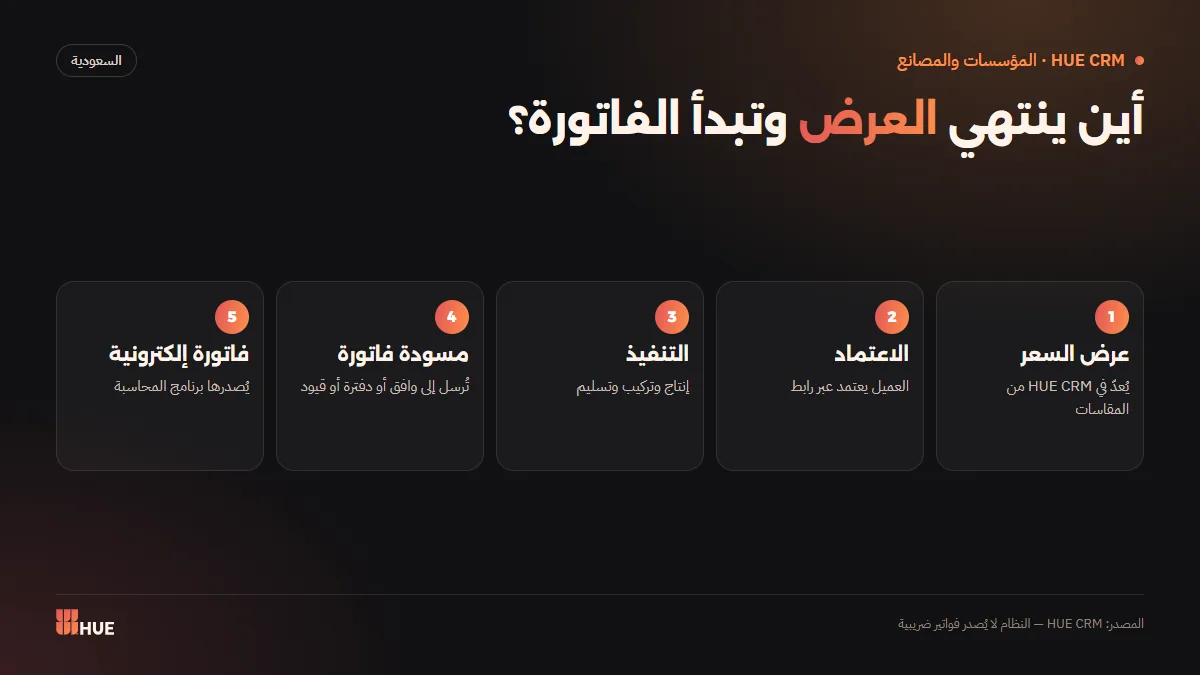
This split is deliberate. HUE CRM does not issue tax invoices and does not claim to, because e-invoicing is the job of accounting software that meets ZATCA requirements. In return, HUE CRM's units of measure are linked to the unit codes used in ZATCA e-invoicing, so the draft reaches accounting as structured data with nothing to retype.
What are the Fatoora integration waves, and who do they cover in 2026?
Phase 1 of e-invoicing (generation) began on 4 December 2021, and Phase 2 (integration) has rolled out in waves since 1 January 2023. Wave 24 covers taxpayers whose VAT-taxable revenue exceeded SAR 375,000, with a deadline of 30 June 2026.
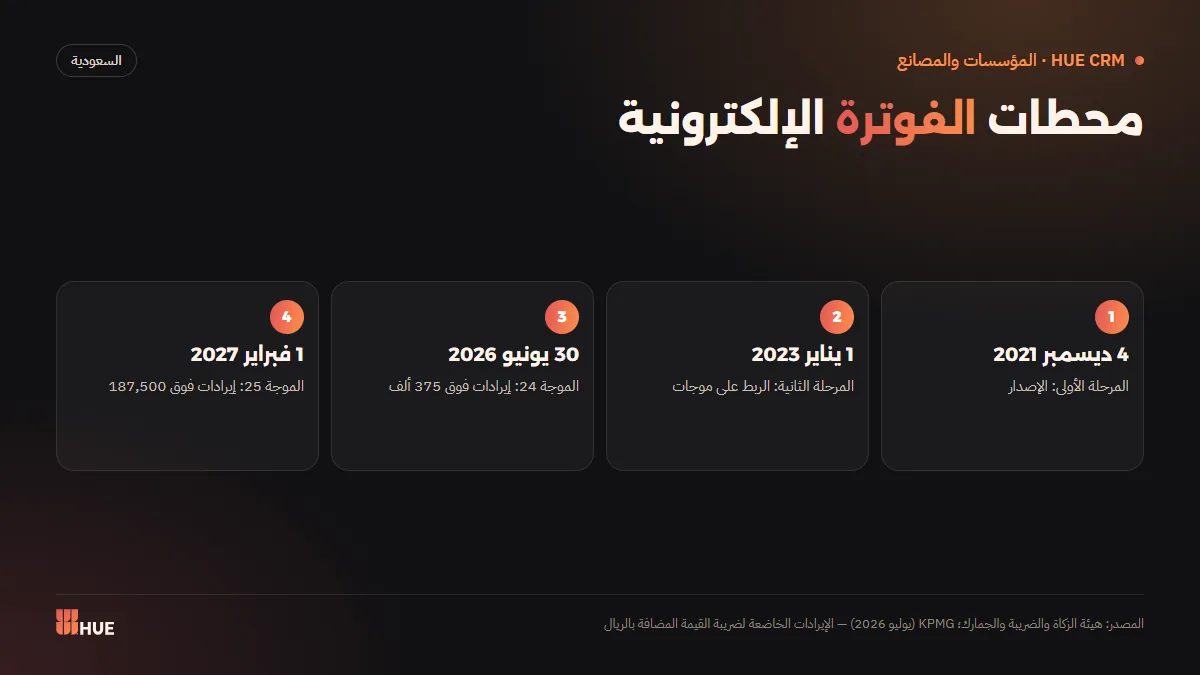
Wave 25 was announced on 24 July 2026 and covers taxpayers whose VAT-taxable revenue exceeded SAR 187,500 in any year from 2022 to 2025, with an integration deadline of 1 February 2027, according to KPMG. The threshold halved compared with the previous wave, bringing many small establishments into scope.
How can a small business prepare for the coming integration waves?
Preparation is not only about choosing compliant accounting software; it also means organising the data that reaches it. A correct e-invoice needs complete customer data, correct units and clear line items, and all of that starts with the quote.
- Review your VAT-taxable revenue for 2022 to 2025 and check for ZATCA notifications.
- Choose accounting software that meets Phase 2 requirements, or confirm your current one is ready.
- Organise customer data now: legal name, VAT number for businesses, address.
- Standardise units and line items in quotes so they carry into the invoice unchanged.
- Connect your customer system to accounting so invoice drafts move without re-entry.
Why is collection slow in establishments?
Collection is usually slow for administrative reasons, not because the customer cannot pay: an instalment nobody chased on time, an invoice issued late, a payment schedule never written down. Regional figures confirm that cash trapped in receivables is a widespread issue.
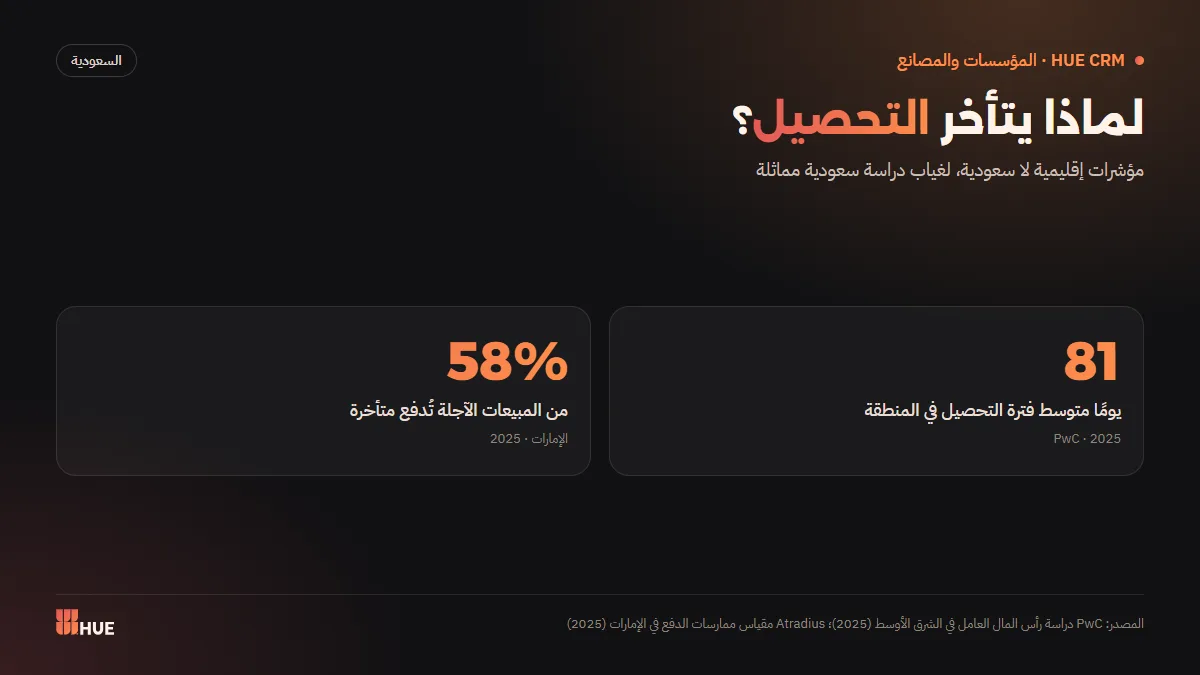
PwC's Middle East Working Capital Study 2025 puts the region's average collection period at about 81 days, a regional average, not a Saudi figure. In the UAE, the Atradius Payment Practices Barometer 2025 found that 58% of B2B credit sales are paid late, a regional proxy we use because there is no Saudi edition of the same survey.
How do you speed up collection, step by step?
Fast collection starts before the work, not after. Agreeing payments clearly at approval, tying each instalment to a stage the customer can see, and reminding at the right time cut much of the waiting.
- Put payment terms in the quote itself so they are part of what the customer approved.
- Tie instalments to job stages (illustrative example: deposit at approval, balance at installation).
- Watch amounts due on one board instead of scattered ledgers.
- Send the invoice draft at handover to your accounting software without delay.
- Remind with a polite, ready message on the due date, not weeks later.
How do you remind customers about overdue payments without awkwardness?
The secret is a reminder that is expected and professional: tied to a completed stage and written in a standard text that does not depend on an employee's mood. Two illustrative templates:
- "Your order has been installed; we hope you are pleased with it. A reminder of the remaining instalment under the approved quote. We are always happy to help."
- "Kind regards. A reminder of the agreed payment date for your order. If you have any notes on the work, we are at your service."
We collected more templates for every sales stage in WhatsApp sales follow-up.
Summary
A quote is the beginning of the money, not the end. Make it clear, built on measurements, approved by link and with payment terms included. Then let the CRM track payments and prepare the draft, and let accounting software issue the e-invoice and handle Fatoora integration. With that split you always know where your money is. For the full picture of the system, read the complete guide to CRM for establishments and factories.
Sources
Questions
Is a quote a tax invoice?
No. A quote is a commercial document issued before the work; a tax invoice is issued at or after supply by an e-invoicing system that meets ZATCA requirements.
Does HUE CRM issue the e-invoice?
No. HUE CRM prepares the invoice draft and sends it to your accounting software (Wafeq, Daftra or Qoyod), which issues the e-invoice and handles Fatoora integration.
Who is covered by e-invoicing Wave 25?
According to KPMG, taxpayers whose VAT-taxable revenue exceeded SAR 187,500 in any year from 2022 to 2025, with an integration deadline of 1 February 2027. ZATCA notifies those covered directly.
How does a customer approve a quote online?
The customer receives a link, opens the quote on their phone and approves it in one tap; the approved version is saved in the order record and its status updates automatically.
How should I split payments across job stages?
Write payment terms into the quote itself and tie each instalment to a clear stage, such as a deposit at approval and a balance at installation, then remind the customer on each due date with a ready message.