Clinic management software in Egypt (2026): how to choose the right system
Good clinic management software in Egypt in 2026 brings the patient file, appointments, finances and patient messaging into one place, runs in the cloud with daily backups, and can be tried before you buy. A long feature list is not enough. It has to fix the problems your clinic hits every day: double bookings, no-shows, paper files and uncontrolled cash.
In this guide:
- Why clinic software has become necessary in the Egyptian market now.
- The difference between cloud software and software installed on a local machine.
- Twelve practical selection criteria, and the questions to ask any vendor.
- How to move from paper to a system without stopping work.
Why does a clinic in Egypt need management software now?
Because pressure on clinics is rising from two sides: a population above 108 million, and a doctor workforce that is not keeping pace, combined with heavy out-of-pocket payment. In that setting every lost appointment and every missing file costs the clinic money and reputation.
According to CAPMAS, Egypt's domestic population reached 108 million in August 2025, while doctor density stood at about 12.8 doctors per 10,000 people in 2021, down from 13.5 in 2017. In the government sector the number of physicians fell to 120.4 thousand in 2024, while private-sector doctors and dentists rose to 35.6 thousand.
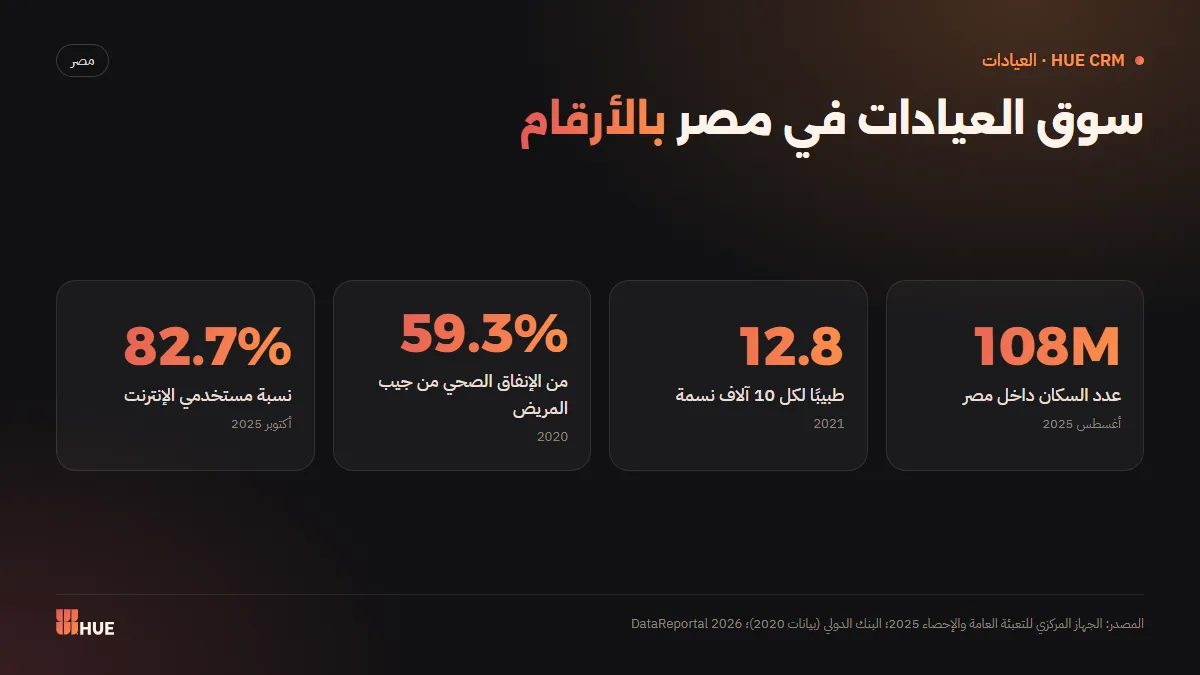
On top of that, out-of-pocket payments make up about 59.3% of current health expenditure in Egypt (World Bank, 2020 data), so patients usually pay cash at the front desk. Meanwhile, internet users reached 98.2 million (82.7% of the population) in October 2025, according to DataReportal. The result: connected patients who expect easy booking, and clinics that need to account for every pound coming in.
What exactly is clinic management software?
Clinic management software is a digital system that runs the whole patient journey: booking, reception and waiting, the consultation and prescription, then the invoice and follow-up. It gives the owner reports on revenue, expenses and attendance instead of relying on notebooks and the receptionist's memory.
In HUE CRM for Clinics, for example, these steps live in one cloud system: a patient file with allergies and chronic conditions plus an instant alert when you prescribe a drug the patient is allergic to, vital-sign charts, appointments with an online booking page, a waiting list with a call screen for the waiting room, invoices, payments and expenses, WhatsApp messages, and reports.
What is the difference between cloud and locally installed clinic software?
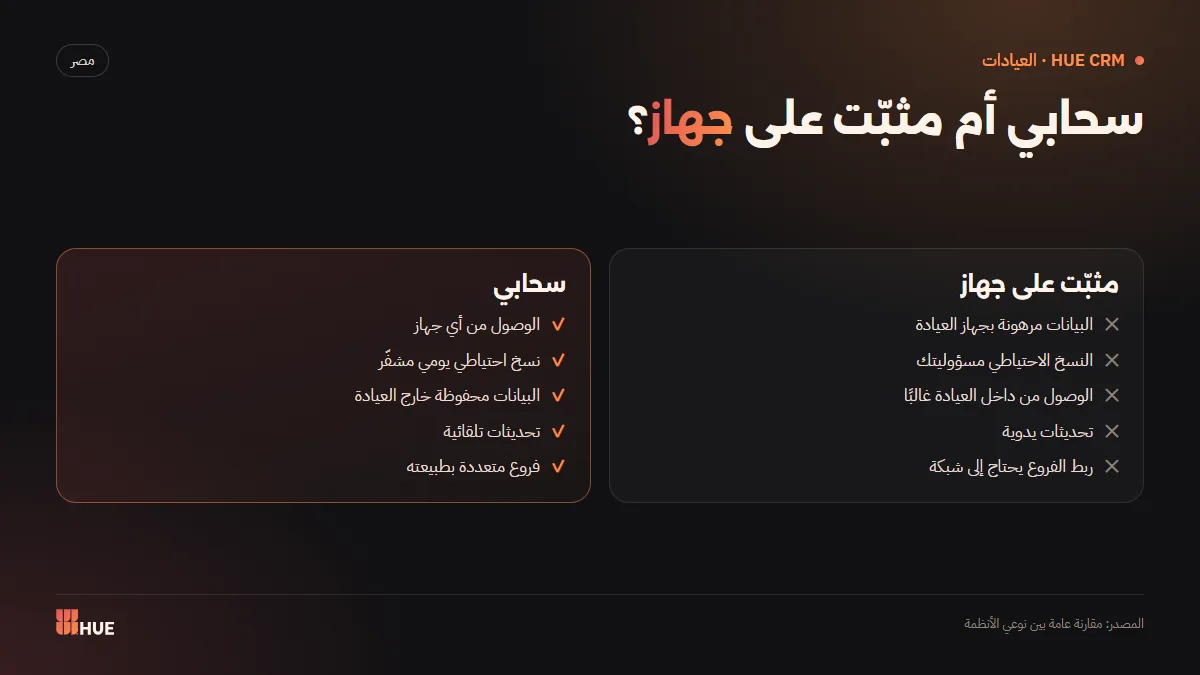
Cloud software runs over the internet on any device, and its data is stored on servers with automatic backups. Installed software runs on a machine or local network inside the clinic, so your data depends on that hardware surviving. The choice determines how safe your data is and whether you can work from outside the clinic.
| Criterion | Cloud software | Installed on a local machine or network |
|---|---|---|
| Access | Any internet-connected device | Usually clinic machines only |
| Backup | Automatic, daily, by the vendor | Your responsibility |
| Device failure or theft | Data kept outside the clinic | Risk of data loss |
| Updates | Arrive automatically | Manual installation |
| Cost | Monthly or annual subscription | Upfront payment plus maintenance |
| Multiple branches | Built in | Needs network linking |
Remember that Egypt's Personal Data Protection Law No. 151 of 2020 classes health data as sensitive data. Where your data lives and how it is protected is part of your professional responsibility, not just a technical detail.
What are the twelve criteria for choosing clinic software in Egypt?
The most important criteria are the ones that touch patient safety and clinic revenue directly: a complete medical file with allergy alerts, online booking with real availability, WhatsApp reminders, clear finances, and security with backups. After that come ease of use, Arabic support, customer support and a free trial before you commit.
Patient-facing
- A complete patient file: history, chronic conditions, allergies, medications and attachments.
- An instant allergy alert while prescribing: it helps reduce prescribing errors. See our guide to the electronic patient file and allergy alerts.
- Vital-sign charts so you can see blood pressure or sugar trends across visits.
Schedule and revenue
- An online booking page that shows real free slots so patients pick their own time, or queue-number booking if your clinic works that way.
- Automatic WhatsApp messages: booking confirmation, a day-before reminder, post-visit follow-up and a review request. Read how to reduce no-shows with WhatsApp reminders.
- A waiting list and call screen to organise the waiting room, as covered in our waiting room and online booking guide.
- Invoices, payments, expenses and reports that show real profit. See the clinic revenue and expenses guide.
Operations and security
- A surgeries module if your clinic operates: booking with a deposit, a prep checklist and post-op follow-up.
- Two-factor authentication and a security log showing who signed in and when.
- Encrypted daily backups stored away from clinic hardware.
- Staff attendance by location if you have a team or several branches.
- A real free trial and Arabic support before any financial commitment.
What should you ask any vendor before subscribing?
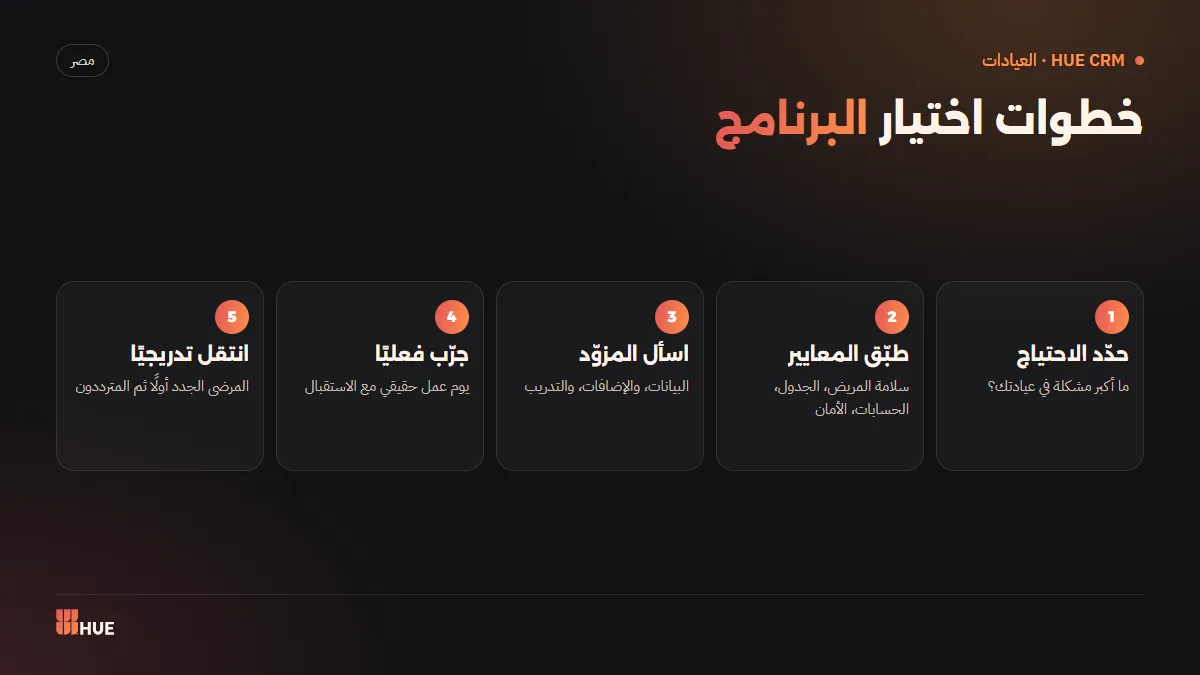
Ask about four things specifically: where data is stored and how it is backed up, whether you can export your data if you leave, what the price includes and what costs extra, and who trains your team in the first days. Clear answers to these matter more than any sales presentation.
- Are backups daily and encrypted? Where are they stored?
- Does the system support two-factor authentication and a sign-in log?
- Does the booking page show genuinely available slots, or just collect requests?
- What do an extra branch and an extra user cost?
- Is there a setup and training service at the start?
- Do WhatsApp messages need an official WhatsApp Business link-up?
How much does HUE CRM for Clinics cost?
HUE CRM for Clinics starts at EGP 449 a month on the Clinic plan, with a discount for annual billing, and two larger plans for busier clinics and medical centres. You can try the system free for 14 days before choosing a plan.
| Plan | Monthly | Annual |
|---|---|---|
| Clinic | EGP 449 | EGP 3,990 |
| Clinic Plus | EGP 749 | EGP 6,990 |
| Medical Center | EGP 1,290 | EGP 11,990 |
Add-ons when you need them: an extra branch is EGP 199 a month, an extra user EGP 39 a month, and the surgeries module EGP 199 a month on the Clinic plan. Two optional one-time services: onboarding and training for EGP 1,000, and an official WhatsApp Business link-up for EGP 2,000, or both for EGP 2,500. Full details are on the pricing section.
How do you move from paper to clinic software without stopping work?
A successful move happens in short stages: start with appointments and new patient files, add returning patients gradually, then switch on finances and messaging. The clinic keeps working while the team learns the system within a few days.
- Name one person inside the clinic to own the transition.
- Enter clinic details, doctors, working hours and consultation fees.
- Register every new patient in the system from day one.
- Add returning patients' files at their next visit instead of all at once.
- Switch on the booking page and the confirmation and reminder messages.
- Review the reports after two weeks and adjust settings.
What are the common mistakes when choosing clinic software?
The most common mistake is choosing from the feature list or the price alone, without trying the software on a real working day. The second is ignoring the receptionist, who will use the system more than anyone. The third is leaving the backup question until something goes wrong. Avoiding these saves you from switching systems a few months later.
- Choosing from the demo alone: a demo shows a system at its best; a trial shows what happens at peak hour.
- Ignoring reception: if booking and check-in are tiring, the system won't be used properly.
- Paying for features you don't need: a solo clinic doesn't need what a multi-specialty centre needs, so start with the right plan and grow.
- Skipping the data question: where is it stored, who can reach it, and is it backed up daily?
- Entering every old file at once: it exhausts the team and delays the start; gradual entry works better.
- Not measuring the result: decide before you start what you want to improve, such as attendance rate or waiting time, then review it after a month.
What changes in the clinic's day once the system is running?
The day shifts from reacting to planning. The doctor starts the day knowing how many bookings are confirmed, the receptionist knows who will arrive and when, and the owner sees the day's revenue and expenses that evening instead of waiting for month-end. The difference isn't one feature; it's a calmer day overall.
| Before the system | After the system |
|---|---|
| Booking by phone and notebook | A booking page showing real free slots |
| Reminder calls, if someone remembers | Automatic WhatsApp confirmation and reminder |
| Hunting for the paper file before the visit | Patient file and allergies in front of the doctor |
| Calling names out loud | A call screen with Arabic voice in the waiting room |
| Counting the cash at month-end | Daily invoices, expenses and reports |
Conclusion
Choosing clinic management software in Egypt is an operating decision that affects patient safety and clinic income together. Focus on the patient file and allergy alerts, online booking with real availability, WhatsApp reminders, clear finances, and security with backups. Then don't decide from the demo alone: try the system on your real daily work.
Sources
Questions
What is the difference between cloud and locally installed clinic software?
Cloud software runs over the internet on any device and the vendor backs up your data, while installed software runs on a machine or network inside the clinic, so your data depends on that hardware.
How much does HUE CRM for Clinics cost?
Plans start at EGP 449 a month for Clinic, EGP 749 for Clinic Plus and EGP 1,290 for Medical Center, with lower annual prices and a 14-day free trial.
Can I move old patient records from paper?
Yes. The easiest way is to add returning patients' files at their next visit while registering every new patient in the system from day one, so work never stops.
Is patient data safe in the cloud?
It depends on the system: look for two-factor authentication, a security log and encrypted daily backups. Egypt's Law No. 151 of 2020 classes health data as sensitive, so it deserves that protection.
Does the software suit both a solo clinic and a medical centre?
Yes. The Clinic plan suits a single doctor, the Medical Center plan suits larger teams, and you can add branches and users as needed.
Is there a free trial?
Yes. You can try HUE CRM for Clinics free for 14 days on your real daily work before choosing a plan.